
Mileage Tracker & Log - MileIQ
MileIQFinance
4.629.72K Reviews
- Version
- 5.36.0.10000448
- Installs
- 1.00M
- Age Rating
- Everyone
Screenshots
Our Review of Mileage Tracker & Log - MileIQ
 Analysis by Appyee
For anyone who drives for work, the hard part of mileage tracking is often remembering to record an ordinary trip before the day gets busy. Mileage Tracker & Log - MileIQ is built around removing that chore: it detects drives automatically, then gives you a log to review and sort. I find that approach more practical than relying on memory, especially when a week includes several short appointments and errands.
What the price tells you—and what it doesn’t
The app is free to download, while in-app purchases range from $5.99 to $139.99 per item. That gives you a way to try the basic experience before deciding whether a paid option suits your driving routine. The range alone does not tell me which purchase is right for a particular person, so I would check the current in-app offer and its terms before committing.
It has a 4.6 average from around 70,000 ratings, and more than a million installs. Those figures suggest that mileage tracking is a common use for the app, but they cannot tell you whether its automatic detection will fit your commute, phone habits, or record-keeping needs. I’d judge it by whether it reliably captures the drives you actually need to document.
Where automatic logging earns its keep
The strongest value is not a flashy report; it is avoiding the blank spots that appear when you postpone logging. A consultant who drives from home to a client, then makes an unplanned stop on the way back, can review the detected drives later instead of trying to reconstruct each distance from memory. That is useful only if the person still checks the entries and classifies them correctly.
I would make a brief end-of-day review part of the routine. Mark business and personal drives while the purpose is still fresh, and add a note when a trip has an unusual reason. This small habit turns automatic capture into a more dependable record rather than a pile of trips that needs detective work at tax time.
Who is likely to get real value
MileIQ makes the most sense for freelancers, salespeople, consultants, and employees who drive regularly and need to separate work travel from personal use. It can also suit someone who has only a few work trips each week but knows that manual logging tends to get forgotten. For drivers with occasional mileage, a simple written log or spreadsheet may be easier than maintaining another app.
The developer is MileIQ, and the app is in the finance category. It is rated for Everyone, was released on January 27, 2015, and its current version is 5.28.0.10000045. Those details help place it as an established mileage-recording tool rather than a general navigation app, but they do not replace checking whether its workflow matches your employer’s documentation requirements.
Getting Started with MileIQ
First things first, downloading and setting up Mileage Tracker & Log - MileIQ is a breeze. Available on both Android and iOS, I installed it within seconds and was ready to go. The app asks for some basic permissions, mainly access to your location, which makes sense since it needs to track your journeys accurately.
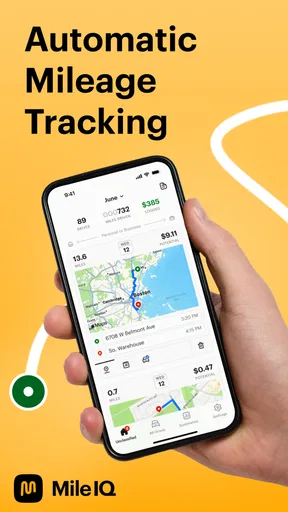
Once you’re all set up, you can start driving without a second thought. The app automatically detects when you’re on the move and begins recording your mileage. No more jotting down notes or trying to remember the details of your last trip. It’s all hands-free, which is a game-changer for those of us who are constantly on the road.
User-Friendly Interface
The interface is clean and intuitive. You’re greeted with a dashboard that provides a quick overview of your recent trips, total mileage, and the potential tax deductions you could claim. I found the interface to be uncluttered and straightforward, which is exactly what you need when you’re managing something as mundane yet essential as mileage tracking.
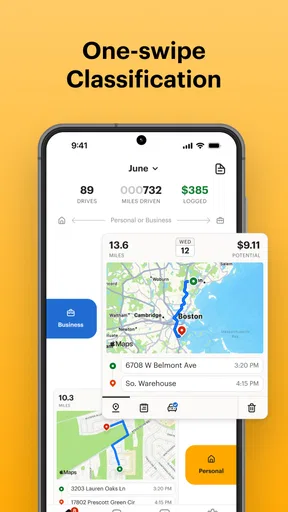
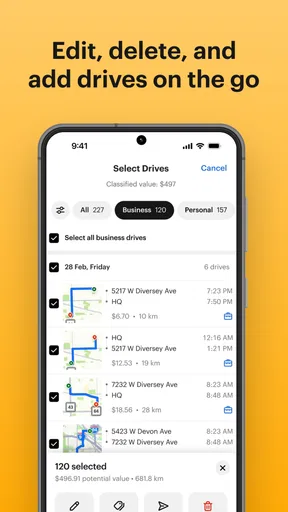
Swiping through the app is a smooth experience, and categorizing trips is as easy as pie. You can label journeys as either business or personal with just a tap. The ability to add notes or edit trips after they’ve been logged is a nifty feature, especially if you need to keep detailed records for tax purposes.
Features That Make a Difference
One feature that I absolutely love is the automatic tracking. Unlike other mileage apps that require you to start and stop a session manually, MileIQ does this all on its own. The app uses smart drive detection to distinguish between actual trips and casual movements, which means it won’t log your trip to the grocery store unless you want it to.
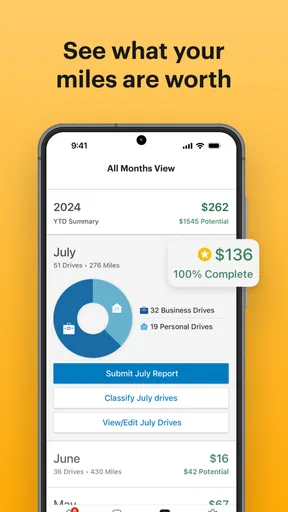
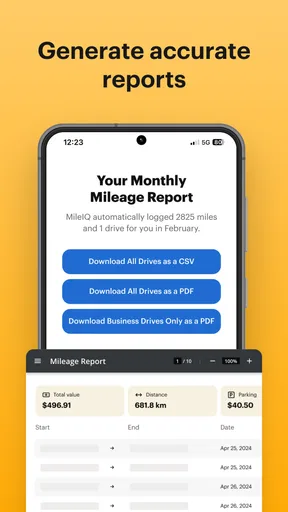
Another standout feature is the ability to generate detailed reports. At the end of the month, you can export your mileage logs into a neat spreadsheet or PDF. This is perfect for submitting expense reports or preparing for tax season. I found the reports to be detailed yet easy to read, giving you just the right amount of information.
Seamless Integration and Customization
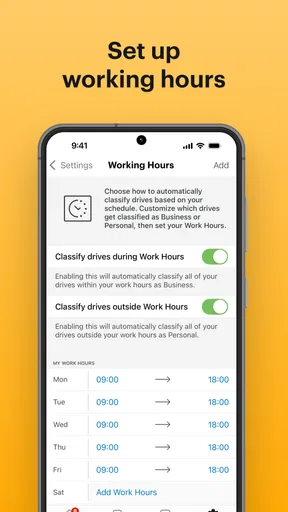
For those who love customization, MileIQ offers plenty of options. You can set work hours, adjust drive detection sensitivity, and even integrate with other apps. I synced it with my calendar to automatically categorize trips based on my schedule. Now that’s what I call efficient multitasking!
The app also syncs across devices, so you don’t have to worry about losing your data if you switch phones. I found this feature particularly helpful, as I often alternate between my personal and work phones.
Pricing and Value
MileIQ offers a free version with a cap on the number of drives it tracks monthly. For heavy users, there’s a premium subscription that provides unlimited tracking. Considering the time and convenience it saves, I’d say the premium version is worth every penny. After all, the potential tax deductions and reimbursements you could earn far outweigh the subscription cost.
In my personal experience, I found myself more organized and less stressed about keeping track of my mileage. The peace of mind it brings is invaluable, especially for those of us juggling multiple responsibilities.
How it compares with a manual log
A notebook or spreadsheet can cost nothing beyond the time it takes to maintain one, and either is a sensible choice if you drive infrequently or prefer to control every entry yourself. The trade-off is that you must remember to record each journey, including its distance and purpose. MileIQ reverses that balance: it aims to capture the drive first, then leaves the classification and checking to you. It is a better fit when missed entries are the main problem, not when you only need to record a handful of trips.
Compared with a mileage app that asks you to start and stop each drive, automatic detection reduces interaction while driving. That convenience is also a reason to review the log: a system that detects movement cannot know whether a particular trip was business, personal, or a mixture. I would not treat an automatically recorded route as a finished expense record until I had checked its label and context.
A practical routine for mixed-use driving
Imagine leaving home for a client appointment, stopping for groceries on the way back, and then heading out again later for a work visit. Automatic capture can spare you from remembering to start a timer for each leg, but the purpose of each drive still matters. I would classify the client visit promptly, mark the grocery trip personal, and use a note for any leg whose purpose is not obvious from the route alone.
That workflow also helps with days that include several short stops. Rather than trying to reconstruct the schedule at the end of the month, use the recent-trip view to check the day while appointments are still easy to recall. If the log contains a drive you cannot confidently explain, investigate it before relying on it for reimbursement or tax records. The app can help organize evidence of travel; it cannot decide what qualifies under your employer’s rules or local tax requirements.
Small choices that improve the record
Work-hour settings and drive-detection sensitivity are worth treating as practical controls, not options to set once and forget. If the app misses a drive or records movements you do not want, adjust the setting and observe how the log behaves over your normal routine. I would change one thing at a time, because that makes it easier to tell whether the adjustment actually improved capture.
Calendar-based categorization can save taps when appointments align neatly with trips, but a calendar entry is not proof that the entire drive was work-related. A detour, a personal stop, or a changed meeting can make an automatic assumption wrong. I see calendar integration as a helpful starting point, not a substitute for reviewing classifications. That distinction is especially important if another person will later rely on the exported report.
Reports are most useful when they are part of a regular handoff rather than a last-minute task. If an employer asks for mileage documentation, check what format and details they accept before sending a spreadsheet or PDF. Keeping entries current and adding notes to unusual trips can make a report easier to interpret, but the recipient’s requirements still take priority.
When the trade-offs matter
Automatic logging depends on location access, so anyone uncomfortable with an app detecting journeys should consider a manual method instead. There is also a review burden: a drive can be captured without being categorized correctly, and a useful record still needs attention. Battery-conscious users may want to watch how the app behaves on their own phone rather than assume that every device and routine will feel identical.
There is a learning period, too. The first days are a good time to check whether ordinary commutes, short stops, and less familiar routes appear as expected. If you share a vehicle, switch often between work and personal driving, or need a highly controlled trip-by-trip process, automatic capture may create more sorting than it saves. In those cases, manual logging or an employer’s required tool can be the better choice.
Choosing a paid option with care
Free access makes it possible to see whether the core workflow suits you, but I would not assume that every level of use is covered at no cost. Before paying, compare the purchase shown in the app with how many drives you need to keep and the reports or workflow you expect to use. A frequent driver who would otherwise lose track of eligible business miles may value the time saved; a person with only occasional trips may not get enough use to justify paying.
I would also separate convenience from financial outcomes. A mileage log may support a reimbursement claim or tax preparation, but the app itself does not guarantee a deduction or determine what is allowable. The sensible question is whether its tracking and record organization solve a recurring problem for you, not whether a projected benefit automatically exceeds the cost.
Final Thoughts
All in all, Mileage Tracker & Log - MileIQ is a robust app that delivers on its promises. It’s user-friendly, efficient, and packed with features that make life on the road a lot easier. Whether you’re a seasoned road warrior or just need a simple way to log your trips, this app has got you covered.
So, if you’re tired of manual logging or just looking for a smarter way to track your mileage, give MileIQ a whirl. It might just become your new favorite travel companion!
Verdict
Strengths of Mileage Tracker & Log - MileIQ
- Automatic trip tracking saves time.
- User-friendly interface for easy navigation.
- Accurate mileage logging and reporting.
- Supports multiple vehicles seamlessly.
- Integrates with popular accounting software.
Limitations of Mileage Tracker & Log - MileIQ
- Limited features in free version.
- Occasional GPS inaccuracies reported.
- No manual trip editing options.
- Subscription can be costly for some.
- Requires constant GPS access.
Similar Picks in This Category
View All
Google Wallet
Google LLC4.3

Airtel: Recharge, Bank & Loans
Airtel4.0

PayPal - Pay, Send, Save
PayPal Mobile4.2

DANA Indonesia Digital Wallet
PT Espay Debit Indonesia Koe4.5

Binance: Buy Bitcoin & Crypto
Binance Inc.4.8

Cash App
Block, Inc.4.7
Frequently Asked Questions
How does MileIQ track my mileage?
MileIQ uses your phone’s GPS technology to automatically detect and record your drives. Once the app is installed and permissions are granted, it runs in the background and logs each trip without manual input. You can then classify trips as business or personal with a simple swipe.
Is MileIQ available on both Android and iOS?
Yes, MileIQ is available for download on both Android and iOS platforms. You can find it on the Google Play Store for Android devices and the Apple App Store for iOS devices. Ensure your device meets the minimum system requirements for optimal performance.
Does MileIQ drain my phone’s battery quickly?
MileIQ is designed to be efficient with battery usage. While it runs in the background using GPS, the app optimizes its tracking to minimize battery consumption. Users generally report minimal impact on battery life during normal use, but frequent drivers might notice a slight increase in usage.
How does MileIQ handle my privacy and data security?
MileIQ is committed to protecting user privacy and data security. The app encrypts location data and stores it securely. Users have full control over their data, with the ability to edit, delete, or export trip logs. MileIQ complies with standard data protection regulations to ensure your information is safe.
What are the subscription options for MileIQ?
MileIQ offers a free version with limited monthly mileage tracking. For unlimited tracking and additional features, users can subscribe to the premium version. Subscription plans are available on a monthly or annual basis, with pricing details available on the app’s official website or app store page.
